 Hewlett-Packard · Singapore
Bringing the printer into the smartphone era.
I led interaction design for HP ePrint and iPrint — turning a confusing, single-LED setup into a wireless printing experience that shipped across iPhone, printer, and web.
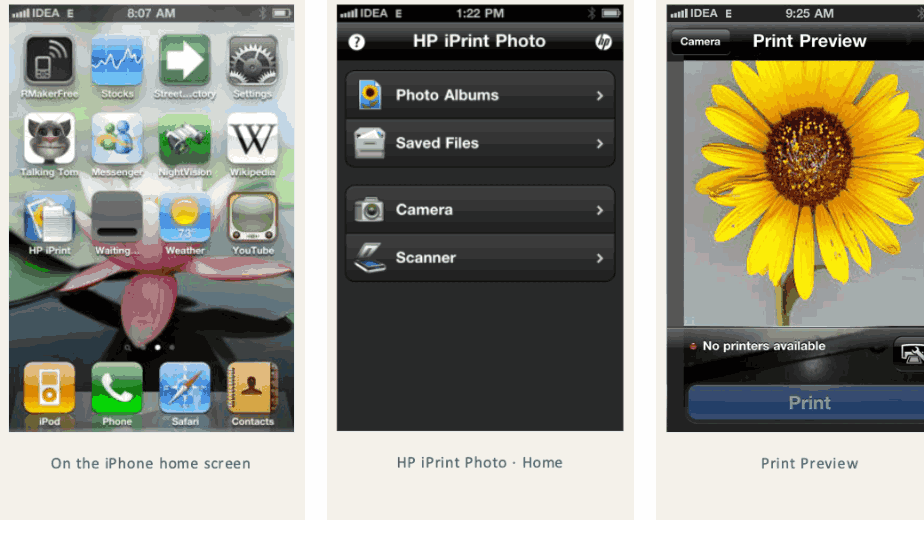
HP iPrint for iPhone — home screen, photo source menu, and print preview.
The world's #1 printer maker had no mobile story.
HP's Imaging & Printing Group was the global market leader, but the smartphone was rewriting how people created and shared documents. Email-to-print — HP ePrint — was the bet to stay relevant. The problem: it barely worked for real people.
Only 1 in 3 users could complete ePrint setup, and a single status LED on the printer was being asked to communicate every ePrint state at once — server status, on/off, error, busy. Users had no way to understand, let alone resolve, what was wrong.
- Constraints I designed within:
- Status had to read consistently across a 4.3″ printer panel, a 2.74″ panel, and the phone.
- Cross-platform reach — the experience spanned printer firmware, iPhone, BlackBerry, and the ePrintCenter web hub.
- I authored the opportunity-evaluation and ROI analysis myself — modeling ~960,000 single-function customers (~15% of the install base) to size the prize and justify the fix.
Three findings that redirected the design.
I ran a structured experience-gap analysis and a usability study on the setup flow. Three insights changed where the design went next.
The setup funnel, not the feature, was broken.
The usability study showed only one in three users could finish ePrint setup. The opportunity wasn't a new feature — it was conversion. I mapped exactly where people fell out and what would lift them through.
One LED can't carry a whole state model.
A single light couldn't tell users whether the server was down, the printer was off, busy, or in error. This gap is what drove the decision to build an on-device Web Services interface instead of leaning on hardware signals.
Status drifted across screens.
The same printer reported its state differently on the 4.3″ panel, the 2.74″ panel, and the phone. Reconciling status into one consistent model became a core requirement, not a polish item.
LED signals vs. an on-device interface.
The cheap path was to keep signalling status through the existing hardware LED. I explored it — and abandoned it.
Keep status on the LED
- One light can't disambiguate server, power, error, and busy states.
- No path to recovery — users couldn't act on what they saw.
- Left the broken setup conversion untouched.
On-device Web Services interface
- A Web Services Summary screen that named every state in plain language.
- An ePrint button strategy that gave setup a clear, recoverable entry point.
- One status model reconciled across both panels and the phone.
Why I pivoted: the gap analysis made it obvious that hardware signalling could never carry the ePrint state model. I authored the wireframes and logic flows — covering every update, error, and recovery state — that engineering built directly from. They were ship-grade specifications, not visual mockups.
Three shipped products, one coherent flow.
The work resolved into a connected wireless-printing experience — capture, preview, print — that reached customers across the App Store, the printer, and the web.
HP iPrint's capture → preview → print flow, designed for the iPhone home screen.
HP iPrint
The iPhone app for wireless photo and document printing. I owned the information architecture and the capture-to-preview-to-print flow, validated through clickable prototypes and partner reviews. Shipped to the App Store.
HP ePrint
Email-to-print across printer, iPhone, and BlackBerry. The on-device Web Services Summary screen and ePrint button strategy came directly out of the gap analysis.
ePrintCenter
I designed the mobile version of the web hub where customers registered connected printers, browsed and added Print Apps, and managed job status and allowed-senders lists — on the phone.
Optional: drop in the Web Services Summary screen and the authored logic flows from the deck.
The marquee outcome: HP launched AirPrint.
My mobile-printing work sat inside the same HP program that became Apple's exclusive launch partner for AirPrint — every one of the twelve launch printers was an HP.
What I'd do differently
I authored the ROI case after the experience problems surfaced. If I ran it again, I'd pair the opportunity model and the usability study from day one — quantifying setup conversion as the headline metric up front, so the on-device interface decision would have been an easy call months earlier rather than an argument I had to build.